
Getting Started with UHHthesis
Source:vignettes/uhhthesis-getting-started-en.Rmd
uhhthesis-getting-started-en.RmdThis guide walks you through installing the UHHthesis package, creating a new thesis project, understanding the project layout, and producing your first PDF or Word output.
Once your project is set up, see Writing Your Thesis for a complete reference on YAML configuration, R Markdown syntax, figures, tables, equations, citations, cross-references, and troubleshooting.
1. Prerequisites
Required software
| Software | Minimum version | Where to get |
|---|---|---|
| R | ≥ 4.2 | https://cran.r-project.org |
| RStudio or Positron | current release | https://posit.co/downloads/ |
| LaTeX | any | see below (TinyTeX recommended) |
Installing LaTeX (TinyTeX)
For PDF output you need a LaTeX distribution. The easiest option across all platforms is TinyTeX, a lightweight TeX Live distribution that automatically installs missing packages:
install.packages("tinytex")
tinytex::install_tinytex()
# After restarting RStudio, verify:
tinytex:::is_tinytex()
Alternative full distributions: MacTeX (macOS), MikTeX (Windows), or TeX Live (Linux).
Installing the UHHthesis package
# Install dependencies
if (!require("bookdown")) install.packages("bookdown")
if (!require("remotes"))  install.packages("remotes")

# Install UHHthesis from GitHub
remotes::install_github("uham-bio/UHHthesis")
Recommended packages used in the templates:
install.packages(c("knitr", "kableExtra", "flextable", "ggplot2"))2. Creating Your Thesis Project
There are two ways to create a new thesis project. Method 2 is recommended because it names the main file correctly for you.
Method 1 — From Template
- In RStudio: File > New File > R Markdown… > From Template
- Select one of the UHHthesis templates:
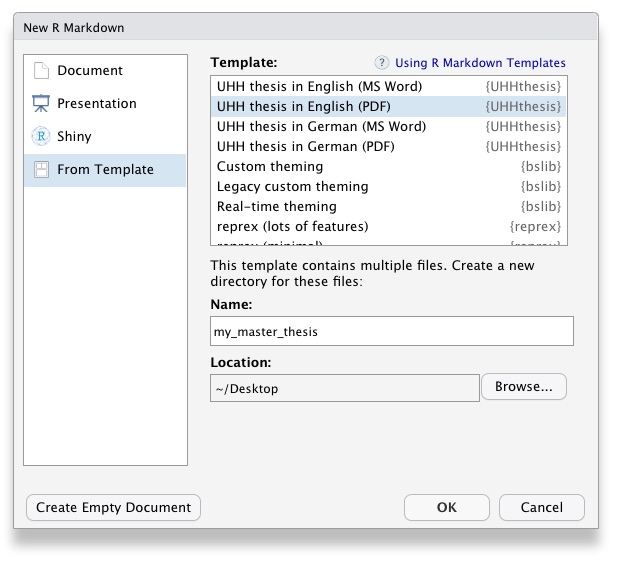
- Choose a directory name and location, then click OK
-
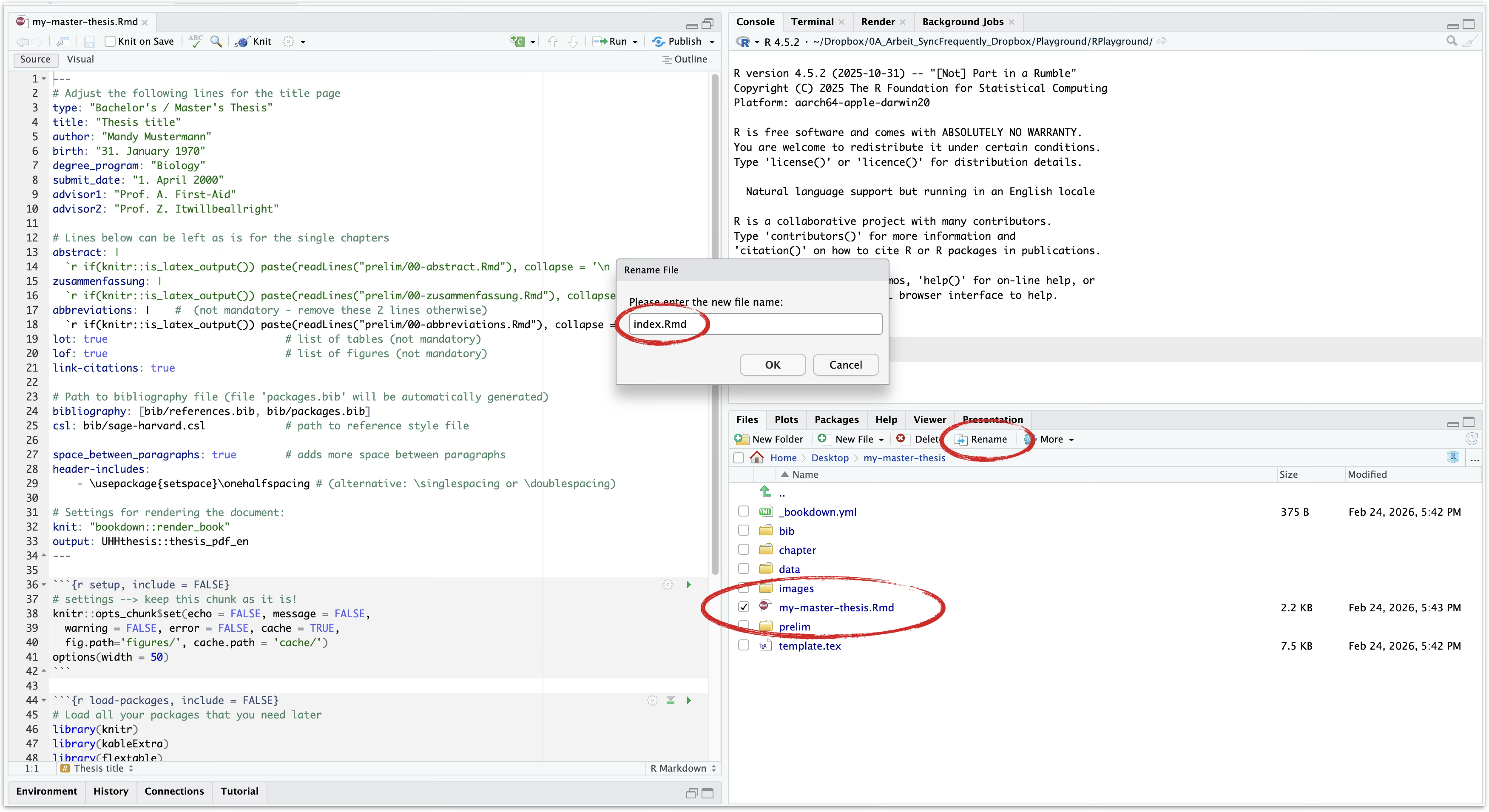
Important: Rename the generated file to
index.Rmd. The build will fail if the main file is not calledindex.Rmd.
Method 2 — New Project (recommended)
- In RStudio: File > New Project > New Directory
- Select Thesis Project using UHHthesis (English PDF) (or the German version) from the dropdown:
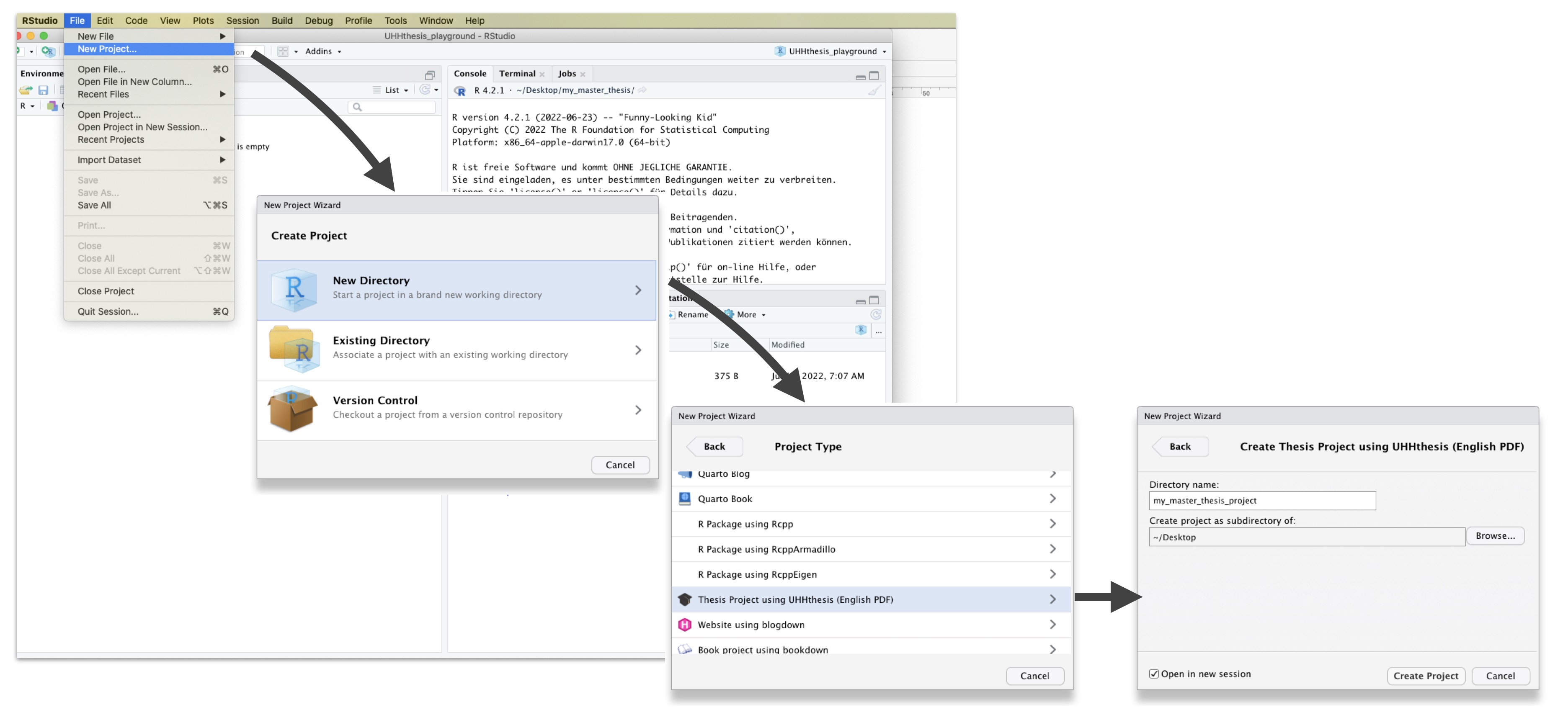
- Choose a directory name and location, then click Create Project
- The project is ready —
index.Rmdis already named correctly.
3. Project Structure
After creating your project you will see the following files and folders:
your-thesis/
├── index.Rmd              # Main file — the ONLY file you knit
├── _bookdown.yml          # Chapter order and output settings
├── template.tex           # LaTeX template (do not edit unless advanced)
├── chapter/
│   ├── 01-intro.Rmd       # Introduction
│   ├── 02-methods.Rmd     # Material and Methods
│   ├── 03-results.Rmd     # Results
│   ├── 04-discussion.Rmd  # Discussion
│   ├── 96-references.Rmd  # References (auto-generated, do not edit)
│   ├── 97-acknowledge.Rmd # Acknowledgements (optional)
│   ├── 98-appendix.Rmd    # Appendix (optional)
│   └── 99-declaration.Rmd # Declaration of Authorship (obligatory)
├── prelim/
│   ├── 00-abstract.Rmd        # English abstract
│   ├── 00-zusammenfassung.Rmd # German summary
│   └── 00-abbreviations.Rmd   # List of abbreviations (optional)
├── bib/
│   ├── references.bib     # Your literature references (edit this)
│   ├── packages.bib       # Auto-generated R package references
│   └── sage-harvard.csl   # Citation style (replaceable)
├── data/                  # Place your data files here
├── images/                # Logos and external images
└── thesis-output/         # Generated PDF/Word files appear here
Key files and folders explained
index.Rmd
This file contains the YAML header, i.e. all meta information, which must appear at the beginning of your document. The file should not contain anything other than the YAML header and the few code chunks that follow! The text you’ll see after the code chunks is for your information only and should be deleted once you have read it.
The first lines in the YAML header configure the title page. Modify these as needed. In the following lines you will find comments explaining which entries must remain unchanged and which you may edit.
Always knit this file th build the thesis.
_bookdown.yml
This is the main configuration file for your thesis. It determines which .Rmd files are included in the output and in what order. Arrange the order of your chapters in this file and ensure that the filenames match those in the corresponding folders.
prelim/
This folder contains .Rmd files for the sections that appear before the main part of your thesis, i.e. the Abstract, Zusammenfassung (the German summary), and the List of Abbreviations (optional). The List of Tables and List of Figures are also optional and are generated automatically, so no additional .Rmd files are required.
chapter/
This folder contains the .Rmd files for each chapter in your thesis
(e.g. 01-intro.Rmd, 02-methods.Rmd, etc.).
Write your thesis in these files. If you’re working in
RStudio, you may find the package wordcountaddin
useful for obtaining word counts and readability statistics in R
Markdown documents.
This folder also contains the back matter (i.e. reference list,
acknowledgements, supporting tables and figures from your method and
result sections, and your declaration of authorship). Please note:
the file 96-references.Rmd is generated
automatically. You do not need to add or modify anything in this
file!
bib/
This folder contains the bibliography files. Add your references to
references.bib. The file packages.bib file is
generated automatically.
data/ and images/
Store your data files and all images that are embedded in your thesis here and reference them in your R Markdown files. See the method chapter in the template and chapter 2.2.1 in the bookdown online documentation for details on cross-referencing tables and figures in R Markdown.
4. Rendering Your Thesis
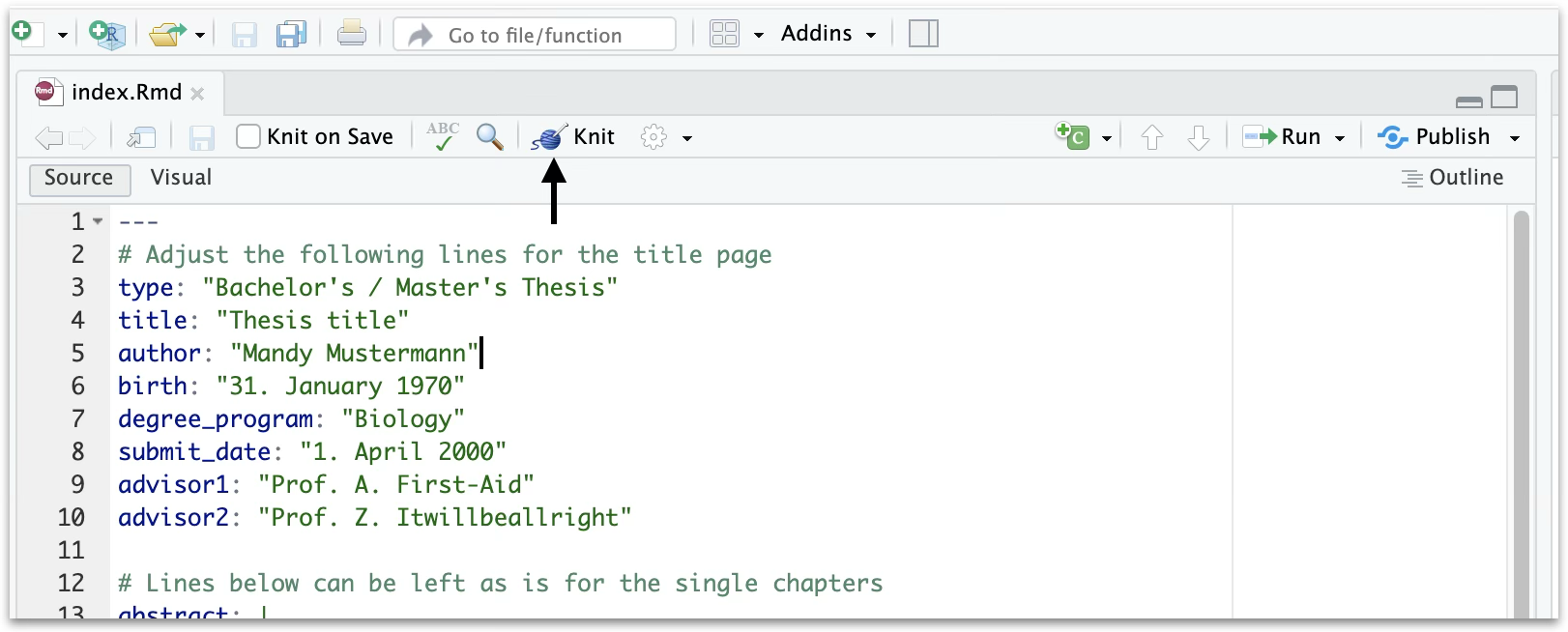
Open index.Rmd in RStudio and click the
Knit button (or press Ctrl+Shift+K /
Cmd+Shift+K):
You can also render from the R console:
bookdown::render_book("index.Rmd")The output file (thesis.pdf or thesis.docx)
appears in the thesis-output/ folder.
Golden rule: Only ever knit
index.Rmd. Never knit individual chapter files — bookdown merges all chapters automatically.
Switching to Word output
To produce a Word document instead of PDF, change the
output: line in the YAML header of
index.Rmd:
If you are working with a Word template, use the Word-specific
project template (UHH thesis in English (Word)), which
uses flextable instead of kableExtra for
tables, since kableExtra does not render correctly in Word
output.
Missing LaTeX packages
If a LaTeX package is missing during rendering, install it with:
tinytex::tlmgr_install("packagename")TinyTeX usually installs missing packages automatically, but occasionally a manual install is needed.
Next: Writing Your Thesis — R Markdown syntax, figures, tables, equations, citations, cross-references, and troubleshooting.